
Ransomware attacks on the healthcare sector jumped 128 percent between 2022 and 2023, and in 2024 roughly 88 percent of healthcare workers opened at least one phishing email. The Office for Civil Rights collected more than nine million dollars in HIPAA fines that same year. In 2025, single settlements have climbed as high as three million dollars, and small practices are not flying under the radar. OCR’s Risk Analysis Initiative has already produced enforcement actions against operations as small as a California imaging clinic with twenty thousand patient records on file.
If you run a clinic in Franklin, Nashville, or anywhere in Middle Tennessee, the rules are changing fast and the audits are getting personal. Here is what HIPAA IT compliance for a small medical practice actually looks like in 2026, what is about to change in May, and where most practices quietly get themselves in trouble.
What the Security Rule already asks of your IT
The Security Rule has been on the books since 2003, and most of what it asks for is not exotic. The problem is enforcement has stiffened, and OCR is no longer accepting “we meant to” as an answer.
Ten controls do most of the work for a small practice.
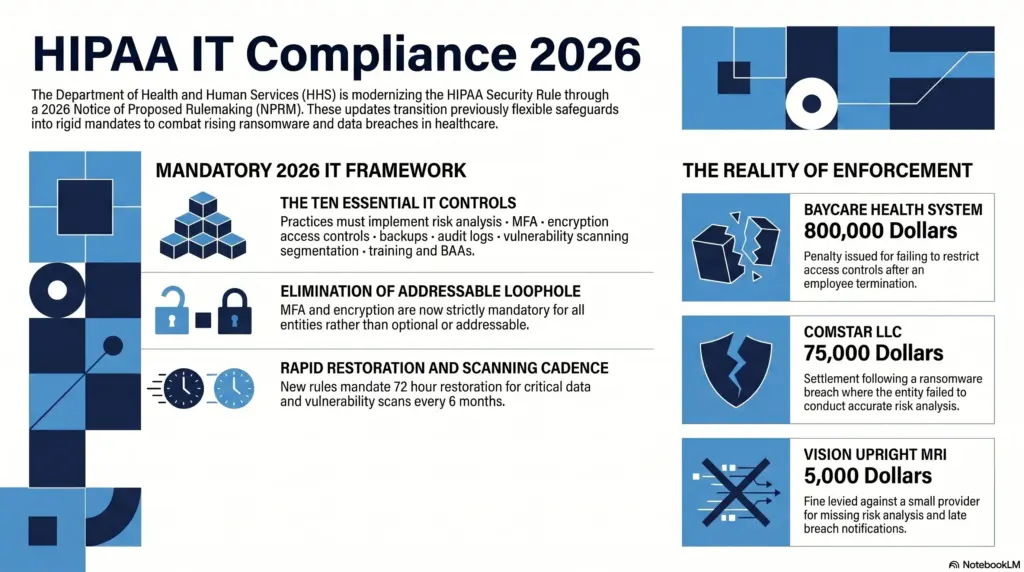
A written risk analysis sits at the top of the list. Failure to conduct one is the single most common reason small practices end up settling with OCR. Vision Upright MRI, a small imaging provider in California, settled for five thousand dollars in early 2025 after a server breach exposed 21,778 patient records. The cash penalty was modest. The corrective action plan that came with it, including two years of OCR oversight, was the real cost.
Multi factor authentication on every account that touches patient data. This applies to your electronic health record system, your email, your VPN, and especially any administrator account. Most healthcare breaches start with a stolen or guessed password, and once an attacker is in your email they own the practice.
Encryption at rest and in transit. AES 256 on hard drives and databases. TLS 1.2 or higher on email and patient portals. The reason this matters is the breach notification safe harbor. If a laptop with encrypted patient data gets stolen, you do not have a reportable breach. If the data is plaintext, you do.
Strict access controls and rapid offboarding. Every user gets a unique login. Role based permissions limit what each person can see. When someone leaves, every credential they ever touched is killed within 24 hours. BayCare Health System settled for $800,000 last year because a terminated employee’s account was used to access patient records after the offboarding never actually happened.
Immutable backups and a real disaster recovery plan. Three copies of your data, on two different media types, with at least one copy stored offline or in immutable cloud storage that ransomware cannot reach. Restore drills monthly. A written contingency plan that gets you back to seeing patients within 72 hours of an incident.
Active audit log review. Most clinics have logs running. Almost none of them are reviewed. OCR specifically called out BayCare for failing to review information system activity, which is exactly what would have caught the terminated employee’s logins the day they started.
Regular vulnerability scanning and patch management. Automated network scans at least every six months, with critical patches applied inside 15 to 30 days. Attackers exploit known flaws far more often than novel ones, and nothing in this category is a surprise.
Network segmentation. Your guest wireless, your smart thermostat, and your imaging machines should not share a flat network with your EHR. When a malware infection happens, segmentation is what keeps a single compromised tablet from turning into a clinic wide outage.
Role appropriate security awareness training. Annual training for everyone, with phishing simulations between cycles. OCR treats absent training as a Security Rule violation in its own right.
A signed Business Associate Agreement on file for every vendor that touches patient data. We will come back to this one, because most practices have BAAs, but the BAAs themselves are usually weak.
What is about to change in May 2026
The HHS Office for Civil Rights published a Notice of Proposed Rulemaking on January 6, 2025. The final rule is expected to land in May 2026, with a compliance deadline 180 days to one year after that.
This is the first significant rewrite of the Security Rule in twenty years, and it closes the loopholes small practices have leaned on for decades. Seven things to prepare for.
First, the distinction between “required” and “addressable” safeguards goes away. Almost every control becomes mandatory. If your IT vendor has ever told you a particular safeguard is “optional” because it is “addressable,” that conversation is over.
Second, MFA becomes explicitly required. Not recommended. Required. On every system that touches patient data, with very limited exceptions.
Third, encryption at rest and in transit becomes mandatory. The “we documented why we did not encrypt it” workaround disappears.
Fourth, you must maintain a written inventory of every technology asset and a network map showing how patient data flows through your systems. Practices that have never produced either document need to start now.
Fifth, vulnerability scanning at least every six months and penetration testing at least annually. Both must be documented, with findings tracked through to remediation.
Sixth, patch management gets a real deadline. Critical patches inside 15 calendar days. High risk patches inside 30. This formalizes what most managed service providers already do, but it creates a written standard OCR can enforce against.
Seventh, contingency plans must restore critical systems within 72 hours of a loss. Backups alone are not enough. You have to prove you can actually get back up and running on that timeline, which means restore testing is no longer optional.
How small practices actually get fined
Five themes show up over and over in OCR enforcement actions against smaller covered entities.
Missing or stale risk analyses are by far the most common. The Risk Analysis Initiative announced in late 2024 has already produced more than ten enforcement actions. Comstar, a medical billing company, settled for $75,000 after a ransomware attack exposed 585,000 records and OCR found they had never done a real risk analysis. Northeast Surgical Group in Michigan settled for $10,000 for the same reason after a ransomware attack on 15,298 patient records.
Inadequate access controls and slow offboarding produce the largest settlements. BayCare’s $800,000 case is the textbook example. The terminated employee should have been gone from the system within hours. They were not, and a patient eventually noticed her records being accessed inappropriately.
Late breach notifications add another layer of penalty. Vision Upright MRI got hit twice in its settlement, once for never conducting a risk analysis, and again for failing to send breach notifications inside the 60 day window.
Failing to actually implement the safeguards your risk analysis identifies. Spotting a vulnerability and then sitting on it for two years is its own violation, and OCR has been increasingly willing to cite it separately.
Failing to review audit logs. If you cannot detect a breach, you cannot report it on time, and OCR knows it.
The ransomware breach trap, and the safe harbor that gets you out
When a ransomware attacker gets to patient data, HIPAA presumes a reportable breach unless you can prove otherwise. This is called the presumed breach rule, and it is the reason ransomware incidents at healthcare practices almost always escalate into public notifications, OCR investigations, and class action lawsuits.
There is an escape hatch, and it is called the encryption safe harbor. If your patient data was encrypted using a prevailing cryptographic standard like AES 256 before the attack, the encrypted blob is considered legally “unusable, unreadable, or indecipherable to unauthorized persons.” It is not “unsecured” ePHI. The Breach Notification Rule does not apply.
This is the single highest leverage technical control on the list. Real encryption, real key management, applied to every laptop, server, backup, and database. Done correctly, it turns a worst case ransomware incident into an internal IT problem instead of a reportable HIPAA breach.
Business Associate Agreements that actually hold up
Almost every IT vendor you use is a business associate under HIPAA. Cloud storage providers like AWS or Azure. Your email host, whether that is Microsoft 365 or Google Workspace. Your EHR. Your billing system. Your backup and disaster recovery provider. Your IT support company. Telehealth and patient portal vendors.
The “conduit exception” people sometimes hear about is extremely narrow. It applies to internet service providers and the postal service, not to anyone who stores or processes patient data.
For 2026, the BAA needs to do more than the boilerplate version your billing software vendor mailed you in 2014. At minimum, look for these clauses.
Annual written verification from the vendor that they have actually deployed required technical safeguards, including MFA, encryption, and segmentation. This verification should include a written analysis by a cybersecurity expert and a signed certification from the vendor’s authorized representative.
Notification within 24 hours if the vendor activates its incident response or contingency plan, not the typical 60 days many older BAAs allow.
Documented vulnerability management practices, including scanning every six months and penetration testing annually.
Flow down clauses that obligate the vendor to require the same standards from any subcontractor it uses.
A right for you, the practice, to audit the vendor and request evidence that these controls are actually being run.
Where to start if you are behind
Most practices we work with at Charger IT fall into the same pattern. A risk analysis from 2019 that has not been updated. MFA on the EHR but not on email. Encryption on the laptops but not on the file server. A signed BAA for the EHR vendor but nothing on file for the cloud backup provider.
If any of that sounds familiar, the cheapest move is to get a current risk analysis done before May 2026. That single document drives everything else: what to fix first, what to budget for, and what to put in front of OCR if you ever get audited.
Charger IT has been doing exactly this work for medical practices across Franklin, Nashville, and the rest of Middle Tennessee for years. If you want a real read on where your practice stands, our Free IT Health Check takes about thirty minutes and gives you a written summary of where you actually are, not where your last vendor told you you were.
For a related look at how Tennessee’s own privacy law is layering on top of HIPAA, see our piece on Tennessee’s TIPA compliance requirements. If you are weighing what a ransomware incident really costs a small business, our breakdown of ransomware costs for a small company walks through the full picture.
The 2026 rule is going to surprise a lot of small practices. The work to be ready for it is mostly the work you should already be doing. The practices that survive an audit a year from now are the ones that started a year ago.